InfoMagpie’s Nest
A conversational knowledge system for recovering useful thinking from very long AI conversations.
InfoMagpie’s Nest is a public, searchable collection connected to the conversations in which much of my research and thinking happens. It gives selected ideas enough structure to be found and used again, without requiring me to stop thinking and maintain a separate note-taking system by hand.
Behavioural diagnosis
I use ChatGPT as a thinking surface. I bring in papers, observations and half-formed questions, follow connections, test explanations and change direction as my understanding develops. Some of these conversations would run to hundreds of pages if I printed them as PDFs.
That makes them productive places to think and terrible places to retrieve a particular thought later. I have tried exporting conversations to Markdown, keeping collections of files and asking AI to synthesise long threads. Each preserves something, but useful distinctions still disappear, lose their context or become buried inside another enormous document.
Conventional second-brain systems have not solved the problem for me either. They usually require me to notice an idea, interrupt the thought process, open another application, decide where the idea belongs and write it up. That transition creates enough friction that capture becomes inconsistent and the system eventually falls out of use.
Digital gardens offer a looser alternative, but the usual metaphor contains its own warning: gardens need tending. Filing, tagging, linking, pruning and polishing can become another job competing with the inquiry the garden was supposed to support.
From barrier to design response
| Observed problem | Underlying barrier | Design response |
|---|---|---|
| Useful ideas disappear inside conversations hundreds of pages long | The conversation is stored as one chronological object, while the valuable unit may be one distinction buried halfway through it | Extract selected ideas into short, independently understandable records |
| Notes are captured inconsistently | Capture requires interrupting the thought process, changing tools and deciding how to file something | Allow material to be prepared, saved and retrieved from the conversational environment already in use |
| The collection becomes burdensome to maintain | Manual categorisation and continual gardening create a second workflow | Generate detailed tags automatically, while keeping them editable; use search and broad browsing areas so every item does not require careful hand-placement |
| Transcripts preserve too much while summaries compress too aggressively | Neither form reliably preserves the particular question, distinction or connection that mattered | Save selected thoughts with enough context to stand alone, while retaining provenance and links |
| External evidence and later interpretation can become blurred | A source, a reaction to it and an inference developed in conversation are different kinds of information | Keep external source records distinct from the thinking developed around them |
What I built
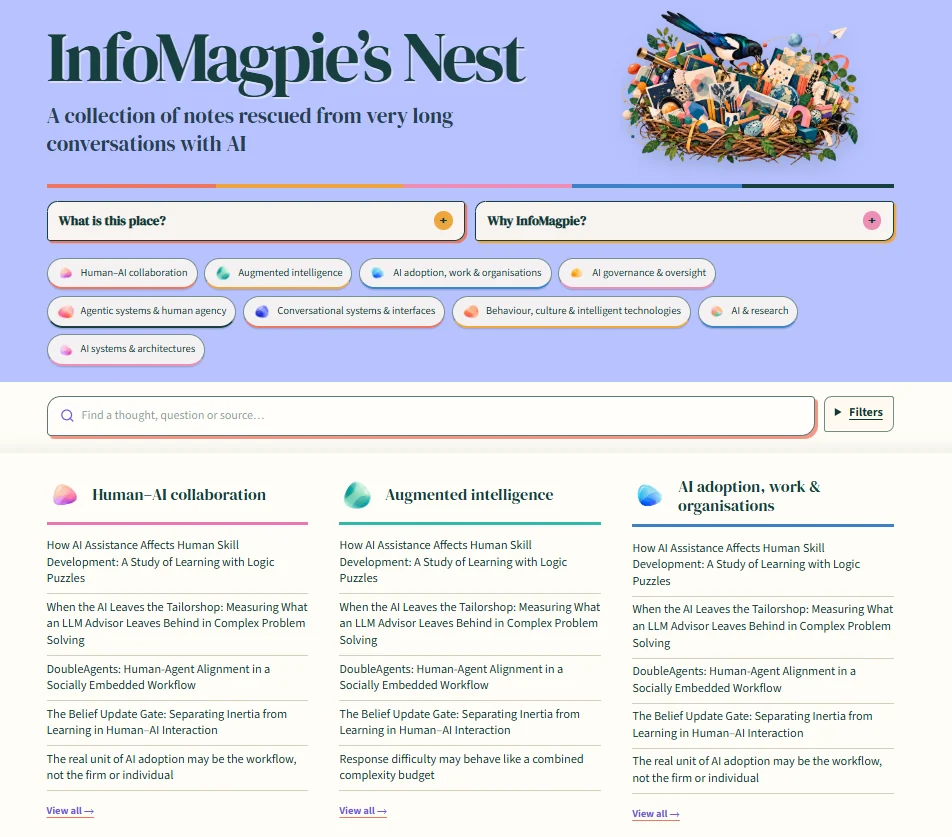
I built a lightweight system for capturing selected ideas from AI conversations and making them retrievable later. It turns useful moments from long discussions into context-complete notes, keeps external sources distinct from my interpretations, records where material came from, generates tags automatically and connects related material.
The collection has two interfaces. A public website supports reading, full-text search and browsing across broad subject areas. A connected ChatGPT tool supports capture and retrieval from the environment in which much of the thinking already happens.
Within InfoMagpie’s Nest, the short thought records are called Pebbles and external papers, reports and other materials are stored as Sources. Those names belong to the collection; the underlying model is more general. It combines modular notes, source records, provenance, flexible metadata, internal links and more than one route back into the material.
The same approach could support book research, learning a new field, a specialist hobby, teaching practice or any long-running inquiry where the interesting part is not only what was read, but what the person noticed while working with it.
How it works
- Think and explore normally. A conversation may start with a source, a practical problem, an observation or a question that is still taking shape.
- Identify what remains useful. At a natural pause, I can ask AI to review the available conversation and propose ideas, distinctions or questions worth preserving. I can also return to an older conversation specifically to harvest it.
- Make the selected item understandable on its own. The wording retains enough context to survive outside the original exchange. I decide what is worth keeping and can revise the interpretation.
- Structure it without creating a filing session. The system records provenance and relevant connections and generates detailed tags automatically. Broad subject areas provide a simpler layer for browsing.
- Save it from the conversation. The connected tool transfers the reviewed record into the collection.
- Find it again. Material can be retrieved through search, subject browsing, detailed tags, internal links or another conversation with the connected tool.
There is no single automatic pipeline through which every item must pass. Sometimes I save an external source directly. Sometimes the valuable result is a question rather than an answer. Sometimes a long conversation produces nothing that needs to be kept.
Important design choices
| Design choice | What it needed to solve | What I built |
|---|---|---|
| Design around the activity already happening | Requiring capture during a train of thought creates interruption and friction | Material can be captured at a natural pause or retrospectively from the conversation where it developed, including conversations that would run to hundreds of pages as PDFs |
| Automate repetitive classification | Manual tagging would recreate the maintenance burden the system was meant to remove | Detailed tags are generated automatically and remain editable as the collection’s vocabulary develops |
| Separate browsing from detailed retrieval | Hundreds of fine-grained labels help search but overwhelm primary navigation | I retained the detailed labels (568 at the time) for search and connection while creating nine broad, overlapping subject areas for browsing |
| Preserve sources and interpretations separately | A tidy note can make a later inference look like something the original source established | Separate Source and Pebble records, with visible provenance, distinguish external evidence from questions, connections and hypotheses |
| Put the material before the map | An early graph showed relationships but displaced the ideas people had come to find | I replaced the graph-led homepage with search, nine subject areas and actual note titles; connections remain inside individual records |
| Give different collections different boundaries | Subject, audience and privacy change what belongs together and how it should be organised | InfoMagpie and BusyDoggie Fieldnotes are separate public collections; the Evidence Garden is private professional evidence, while Inner Magpie is private personal insight |
How I worked with AI
AI made it feasible to inspect long conversations, propose candidate notes, rewrite selected passages so they make sense independently, generate tags, help connect related material and implement the website and conversational tools. That reduced both the cost of building the system and the maintenance burden that had undermined previous approaches.
I defined the problem, the record types and their boundaries, the role of provenance, the browsing structure, the access levels and the criteria for what was worth keeping. I tested the working system, identified when an implementation or interaction did not serve the task and revised the specification. The project developed through repeated use rather than through a complete design produced in advance.
Make your own
The approach does not depend on copying the Nest’s name, subject areas or visual design. A useful version could remain a collection of structured files, use an existing notes application or add a private or public website later.
-
How to build a personal thinking garden
Start with the problem, decide what is worth preserving and design the smallest useful collection.
-
Use a conversation to find what is worth keeping
Explore first, identify candidate notes at a natural pause and review them before saving.
-
Model notes, sources and connections
A reusable content model covering source records, notes, provenance, identifiers, metadata and links.
-
Connect a thinking garden to ChatGPT
Functions, permissions and checks for conversational capture and retrieval.
-
Build an optional site for a thinking garden
A minimal public or private browsing interface and the checks needed before publishing it.
What this project demonstrates
Capabilities applied
| Capability | Evidence in this project |
|---|---|
| Behavioural diagnosis | Conversations that would run to hundreds of PDF pages were productive for thinking but poor for retrieval; systems that required switching tools and filing notes introduced enough friction to fall out of use. I translated those observed failures into design requirements. |
| Workflow design | Capture happens at a natural pause or retrospectively inside the conversational environment already in use, while automated but editable tagging removes a separate classification session. |
| Information architecture | I retained the detailed labels (568 at the time) for search beneath nine broad browsing areas and separated external Sources from interpretive Pebbles. |
| Conversational tool design | I specified a connected tool for saving and retrieving records from conversation while keeping the public reading website as a separate interface with a different job. |
| Iterative AI prototyping | Testing showed that the original graph-led homepage obscured the material, so I replaced it with search, subject areas and note titles; use also showed that detailed retrieval labels could not double as primary navigation. |
Capabilities extended
The project extended my practical experience of designing structured records, specifying conversational tools and turning an evolving concept into a working web application. It also developed my ability to design where automation belongs inside a knowledge workflow: repetitive classification can be delegated, while selection, interpretation and correction remain available to the person using the system.
What I learned
Capture cannot be treated as an administrative step added after thinking. If the transition is effortful enough, a knowledge system receives only a small and unrepresentative fraction of what was useful. Automated tagging helps for the same reason: it removes routine tending while preserving multiple routes back into the material. AI changes the design space when it reduces friction inside the activity itself, rather than merely producing another place where information accumulates.